There are no official Windows 12 system requirements, because there’s no official Windows 12. Anyone stating specific numbers as confirmed fact is guessing, dressed up to sound like a leak. What we can do honestly is look at Windows 11’s actual requirement history, including how it’s already shifted since 2021, and use that to build a reasonable, clearly-labeled prediction rather than pretending it’s settled.
Windows 11’s requirements today, as the actual baseline
Before predicting anything, it’s worth being precise about where things stand right now, since a lot of the guesswork about a future release skips right past this.
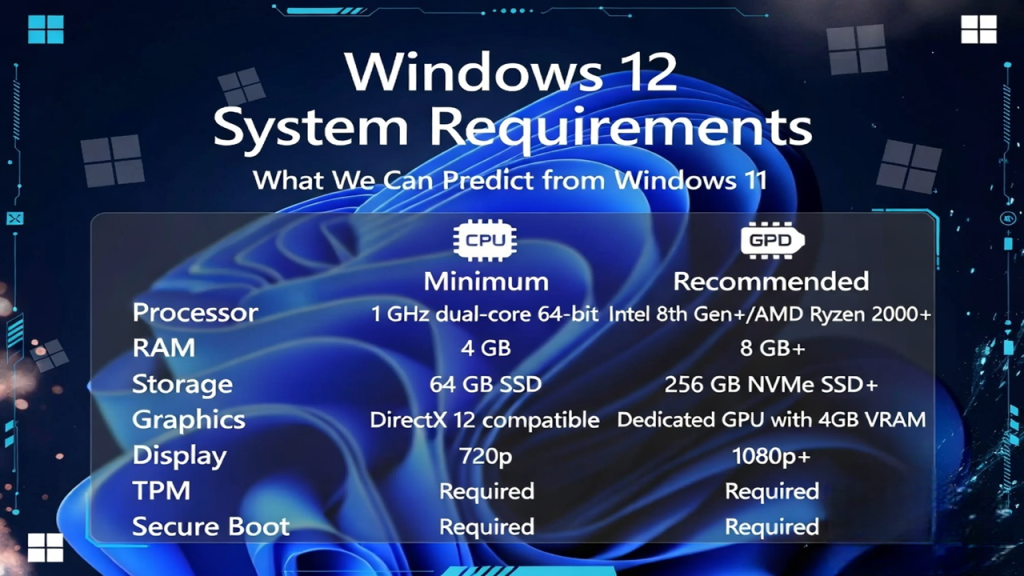
Standard Windows 11 requires a 64-bit processor with two or more cores, TPM 2.0 enabled, UEFI with Secure Boot support, 4GB of RAM, and 64GB of storage. These requirements caused real friction when Windows 11 launched in 2021, since TPM 2.0 in particular locked out a meaningful number of otherwise capable older PCs.
On top of that baseline, Microsoft’s Copilot+ PC tier adds a separate, higher bar specifically for on-device AI features: an NPU capable of at least 40 TOPS (trillion operations per second), a minimum of 16GB of RAM, and a 256GB SSD, running Windows 11 version 24H2 or newer. Qualifying processors currently include Qualcomm’s Snapdragon X series, Intel’s Core Ultra 200V and newer Panther Lake chips, and AMD’s Ryzen AI 300 series.
That’s two distinct tiers already existing within Windows 11 itself: a baseline requirement for the OS to run at all, and a meaningfully higher bar for the newest AI features specifically. This split is actually the most useful data point for predicting what comes next.
The reasonable prediction: requirements likely rise in the same direction, not a clean break
Given that pattern, the most defensible prediction isn’t a wildly different set of requirements, it’s a continuation of the same trajectory Microsoft has already been on. A few specific, grounded predictions:
Baseline requirements probably tighten further, not loosen. Windows 11 already raised the bar considerably from Windows 10 with TPM 2.0 and Secure Boot. Microsoft’s general direction across the past several years has been toward tighter security requirements, not more permissive ones, so a further-restricted baseline (rather than a return to more lenient specs) is the more plausible direction if a new major version arrives.
NPU requirements likely become closer to standard rather than a separate premium tier. Right now, a base-level Windows 11 PC works fine without any NPU at all. Given how heavily Microsoft has invested in on-device AI messaging, a next-generation release folding NPU support into a more standard expectation, rather than keeping it as a distinctly separate hardware program, is a reasonable extrapolation. Some coverage has floated maintaining or exceeding the current 40 TOPS threshold, though no specific number beyond today’s Copilot+ standard has been confirmed by Microsoft or by chip manufacturers.
RAM and storage minimums probably increase modestly. Windows 11’s baseline 4GB RAM requirement already feels dated relative to how the OS actually performs in practice, and Copilot+ PCs already require 16GB as a practical minimum for AI workloads. A next-generation release raising the base RAM requirement, even without factoring in AI features specifically, would be consistent with normal OS evolution rather than a surprising jump.
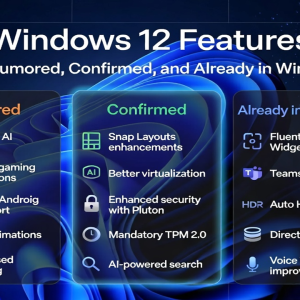
Backward compatibility remains a real constraint, whatever else changes. One recurring theme in credible reporting around modular Windows concepts (sometimes referred to as CorePC) is the idea of separating system components to allow more flexible, scalable requirements depending on device type. If that architecture ever ships, it’s plausible that requirements could vary more by device category than they do today, rather than applying one uniform spec across every PC. This remains speculative architecture, not confirmed engineering, and it’s worth treating it that way. For more on where CorePC stands as a concept versus a shipping reality, see our full breakdown in Windows 12 Features: What’s Rumored, Confirmed, and Already in Windows 11.
Specific numbers you’ll see online, and why to be skeptical of them
You’ll come across pages stating precise specs for Windows 12 as though they’re confirmed, most commonly a hard 40 TOPS NPU minimum framed as a Windows 12 requirement specifically, sometimes with additional invented figures for RAM or storage. Here’s the honest context: 40 TOPS is real, but it’s the current Copilot+ PC requirement that already exists inside Windows 11 today, not a new number specifically confirmed for an unreleased future release. Reporting that presents this figure as a “Windows 12 requirement” is repurposing an existing, already-public spec and attaching it to an unconfirmed product, which makes it sound more authoritative than it actually is.
The same caution applies to any oddly precise storage or RAM figure you see attached to Windows 12 specifically. If a number isn’t attributed to an actual Microsoft statement or a verifiable Windows Insider build, treat it as speculation dressed up with false precision.
What this means if you’re buying hardware now
If you’re shopping for a new PC and wondering whether to future-proof against Windows 12 requirements specifically, here’s the practical takeaway: buying hardware that already meets or exceeds the current Copilot+ PC tier (40+ TOPS NPU, 16GB+ RAM, 256GB+ SSD) is a reasonable hedge, since any next-generation release building on Microsoft’s current AI direction would very likely require at least this much, probably more over time. Buying only to the bare Windows 11 baseline (4GB RAM, no NPU) leaves you with a machine that would almost certainly need replacing again if a genuinely new release arrives with AI-centered requirements, which current trends suggest is more likely than not.
That said, there’s no confirmed timeline forcing an urgent decision. Current reporting points to 2027 at the earliest for any next-generation release, and Microsoft has directly stated that near-term announcements do not include a new OS version. For the fullest picture of where things actually stand, see our Windows 12 release date and status tracker, which we update as real developments happen.
How to think about this if you’re not ready to upgrade at all
If your current PC runs Windows 11 comfortably and you’re not chasing the newest AI features specifically, there’s no pressing reason to upgrade hardware purely on Windows 12 speculation. Windows 11 has a long support runway ahead of it, and Microsoft’s own roadmap emphasis has been on refining and stabilizing the current OS, not rushing a replacement. Treat any purchase decision as being about your actual current needs (performance, battery life, specific AI features you’d genuinely use) rather than trying to preemptively satisfy requirements nobody has actually published yet.
For a deeper look at what Copilot+ hardware already delivers today, independent of any Windows 12 speculation, see Windows 12 AI Features: What Copilot+ Already Tells Us. And if you’ve seen a specific “leaked requirement” claim you’re trying to evaluate, our guide to fact-checking Windows 12 rumors walks through how to tell a credible source from a fabricated one.
Questions worth answering directly
Will my current PC be able to run Windows 12? Nobody can answer this with certainty yet, since there’s no confirmed Windows 12 and therefore no confirmed requirements. If your PC already meets the Copilot+ PC tier, it’s reasonably well positioned based on current trends.
Is 40 TOPS a confirmed Windows 12 NPU requirement? No. That figure is Microsoft’s existing, current Copilot+ PC requirement within Windows 11 today. It has not been separately confirmed as a Windows 12-specific requirement, though it’s a reasonable minimum baseline to expect given current direction.
Should I buy a new PC now to prepare for Windows 12? Only if you have a genuine reason to upgrade anyway. There’s no confirmed release date creating urgency, and current estimates place any next-generation release no earlier than 2027.
Will TPM 2.0 and Secure Boot still be required? Almost certainly, given Microsoft’s consistent direction toward tighter security requirements over the past several release cycles, though this isn’t officially confirmed for any future release specifically.
Where can I check my current PC’s Copilot+ eligibility? Check Settings, System, About, to see your processor family, or look for the Copilot+ badge directly on a device’s specifications from the manufacturer.